Views: 0 Author: Site Editor Publish Time: 2026-04-01 Origin: Site
Choosing the right encoder can be a game-changer for video production. With the rise of NDI technology, selecting the right HDMI to NDI encoder is crucial for seamless video streaming. In this article, we’ll discuss the five essential factors to consider when purchasing an HDMI or SDI to NDI encoder. You’ll learn how to choose the best encoder based on your production needs, budget, and technical requirements.
Understanding NDI Technology Network Device Interface (NDI) is a video-over-IP protocol developed by NewTek, which allows high-quality video and audio transmission over standard IP networks. Unlike traditional video transmission methods that rely on physical cables, NDI converts video signals into data that can be transferred over Ethernet, significantly reducing the need for bulky cables. This shift enables seamless connectivity between devices on the same network, facilitating real-time video streaming, recording, and editing without complex setups.
NDI vs. HDMI and SDI When comparing NDI to HDMI and SDI, the key differences lie in flexibility, distance limitations, and overall system requirements. While HDMI and SDI are excellent for point-to-point connections, they require physical cables and are limited by distance, especially for HDMI, which is ideal for short runs. SDI, on the other hand, supports longer cable runs but still demands specialized cabling and hardware, often making it less adaptable in a modern, scalable workflow.
In contrast, NDI offers high scalability, as it can work over existing IP networks, allowing multiple video streams to travel across the same network without degrading quality. It supports various resolutions (including 4K and beyond), and unlike HDMI and SDI, NDI doesn't require direct wiring between devices. This makes NDI the preferred choice for environments where flexibility, easy integration, and low latency are crucial, such as live broadcasting and remote production.
Comparison Table: NDI vs. HDMI vs. SDI
Feature | NDI | HDMI | SDI |
Transmission Type | IP-based (Ethernet, Wi-Fi) | Physical HDMI cable | Physical SDI cable |
Distance Limitations | Unlimited (network dependent) | Typically up to 50 feet | Up to 300 feet (with boosters) |
Latency | Low (near real-time) | Very low (direct connection) | Very low (direct connection) |
Scalability | Highly scalable, supports many devices | Limited to one device per cable | Moderate scalability |
Video Quality | High (supports HD, 4K, 8K) | High (up to 8K with HDMI 2.1) | High (robust for professional use) |
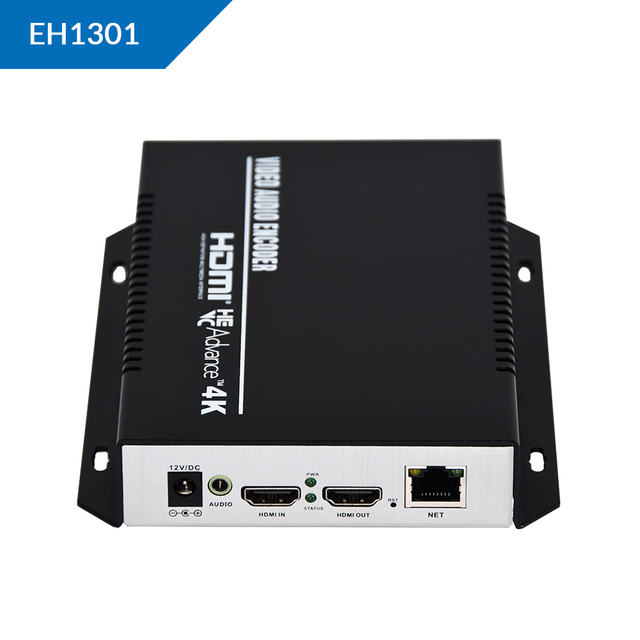
HDMI Encoders HDMI is a widely used interface, especially for consumer-grade devices such as laptops, cameras, and gaming consoles. It excels in short-distance connections, typically under 50 feet, making it a practical choice for smaller productions, home studios, or simple live streaming setups. HDMI encoders are easy to use and more affordable, which makes them a go-to for budget-conscious creators. However, HDMI is limited in terms of scalability and distance. When multiple devices need to be connected or when the distance exceeds a few meters, HDMI may not provide the reliability required for larger-scale production.
SDI Encoders SDI, or Serial Digital Interface, is built for professional environments and long-distance transmission. It is the preferred choice for large-scale live productions, such as concerts, conferences, and broadcast studios. SDI supports longer cable runs—up to 300 feet or more—without signal degradation, providing a more robust and reliable video signal compared to HDMI. Additionally, SDI uses locking BNC connectors, which prevent accidental disconnections during high-demand live events. This makes SDI a superior option for environments where stability and reliability are essential, and where longer cable distances are needed.
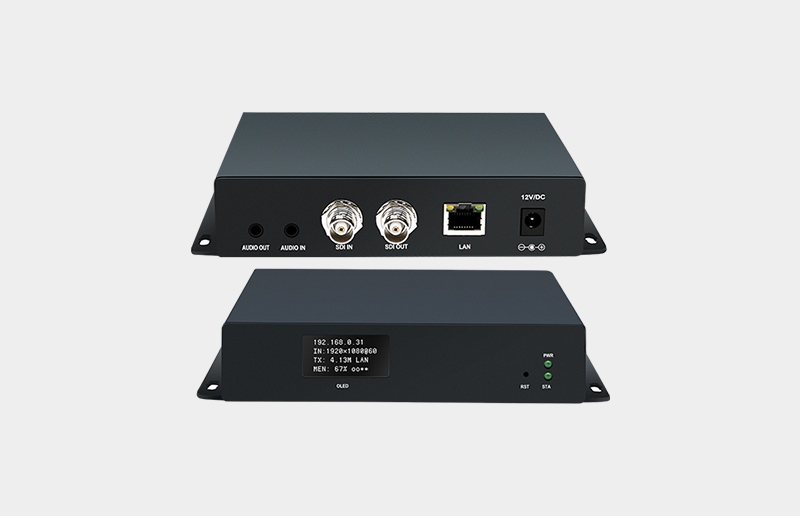
How to Choose Based on Your Setup The decision between HDMI and SDI largely depends on your existing equipment and production requirements. If you're working with consumer-grade devices and need a cost-effective solution for short-distance video streaming or small-scale events, an HDMI encoder will meet your needs. On the other hand, if you're working in a professional broadcast environment or need to handle longer distances and higher stability, an SDI encoder is the better choice. Consider the type of video sources, cable lengths, and reliability you need when making your decision.
Comparison Table: HDMI vs. SDI
Feature | HDMI | SDI |
Best for | Short-distance, consumer devices | Long-distance, professional setups |
Distance | Typically up to 50 feet | Up to 300 feet or more |
Signal Stability | Prone to interference over long distances | Very stable, reliable signal transmission |
Connector Type | Standard HDMI connectors | Locking BNC connectors |
Cost | Generally more affordable | Higher cost, more robust |
Full NDI Full NDI provides high-quality, lossless video transmission with minimal latency, making it ideal for large-scale productions such as live broadcasts, studio setups, or high-end video productions. It supports resolutions up to 8K and is designed to deliver flawless video quality without compression artifacts, which is critical for environments where every detail matters. Due to its bandwidth demands, Full NDI requires a robust network infrastructure, typically a 1GbE or 10GbE network, to ensure smooth and uninterrupted video streams.
NDI|HX NDI|HX, on the other hand, uses video compression (usually H.264 or H.265) to reduce the bandwidth requirements significantly. This makes it suitable for environments where network capacity is limited or for remote production setups, like in education or smaller-scale live streaming. Although NDI|HX introduces some latency due to the compression process, it remains a viable option when bandwidth efficiency is crucial. It works well on standard Gigabit Ethernet networks, even in Wi-Fi-connected environments.
How to Choose Based on Your Needs When choosing between Full NDI and NDI|HX, consider the bandwidth available and the video quality required. If your production demands the highest video quality and low latency, Full NDI is the better choice, provided you have a network that can handle it. However, if you're dealing with limited bandwidth or need a more flexible solution for remote or smaller-scale productions, NDI|HX offers an effective balance between quality and network efficiency.
Matching Encoder with Camera Resolution and Frame Rate When selecting an encoder, it is essential to ensure that it supports the resolution and frame rate output by your camera. For example, if your camera outputs in 1080p60, the encoder must be capable of processing that resolution and frame rate without any loss of quality. This ensures that the video signal remains consistent throughout the production process. Similarly, for 4K content, ensure the encoder is capable of supporting 4K video transmission at the desired frame rates (e.g., 30fps or 60fps).
Future-Proofing with 4K Support As video production increasingly shifts to higher resolutions, having an encoder that supports 4K video becomes essential, especially for professional and high-end productions. If you plan to stream or record in 4K at 60fps, ensure your encoder supports inputs like 12G-SDI or HDMI 2.0, which are necessary for handling the higher data throughput required for 4K video. This ensures that your system remains relevant as production standards evolve.
Comparison Table: Resolution and Frame Rate Support
Feature | 1080p Resolution | 4K Resolution |
Supported Frame Rate | 60fps or lower | 30fps or 60fps |
Required Encoder Input | HDMI/SDI | HDMI 2.0/12G-SDI |
Best For | Standard video setups | High-end, future-proof production |
Hardware Encoders Hardware encoders are designed for environments where stability and performance are critical. They are ideal for high-risk, mission-critical applications such as live broadcasting, sports events, and large-scale productions. These encoders offer the highest reliability since they are purpose-built and not reliant on general-purpose operating systems, making them less prone to crashes or interruptions. Hardware encoders are also optimized for real-time encoding, providing low latency and ensuring that streams remain uninterrupted during the entire broadcast.
Software Encoders Software encoders are often more affordable and can be used in smaller, less demanding production environments. These encoders run on general-purpose computers and can be more flexible in terms of features and functionality. However, they tend to be less stable compared to hardware solutions. Software-based encoding is more vulnerable to crashes, system updates, and other background processes that can disrupt the stream. While they work well for budget-conscious projects or non-critical productions, their performance can fluctuate depending on the system’s overall health.
How to Choose Based on Your Needs The choice between hardware and software encoders depends on your production’s reliability needs. If you are working in a professional environment where stream continuity is essential, a hardware encoder will provide the stability you need. For smaller-scale or non-critical applications, a software encoder may suffice, especially if the budget is a concern.
PoE (Power over Ethernet) PoE technology allows both data and power to be transmitted over a single Ethernet cable, simplifying installations, especially in mobile and on-location productions. This reduces the number of cables needed, which is especially beneficial for live events or remote shoots where space and equipment flexibility are critical. PoE also ensures that there are fewer power sources to manage, making the setup process quicker and more efficient.
PTZ Control Many modern encoders come with built-in PTZ (Pan, Tilt, Zoom) control, allowing operators to control cameras remotely without needing separate control systems. This feature is crucial for multi-camera shoots, where precise camera movements are necessary for a seamless production. Additionally, the integration of TALLY lights helps signal when cameras are live, improving coordination during fast-paced production workflows.
Multi-Platform Streaming The ability to stream simultaneously to multiple platforms is a powerful feature for today’s live broadcasts. Some encoders support outputting both NDI streams and RTMP streams at the same time. This is ideal for reaching a broader audience by streaming to various platforms such as YouTube, Facebook, or custom RTMP servers, all without requiring additional hardware or software.
Choosing the right HDMI or SDI to NDI encoder depends on factors such as resolution, bandwidth, and reliability. By considering these key elements, you can make an informed decision that fits your production needs. ORIVISION Electronics Co., Ltd. offers high-performance encoders, like the NH1000, which ensure seamless video transmission with low latency and flexible integration for professional and mobile productions.
A: An HDMI to NDI encoder converts HDMI video signals into NDI format, enabling high-quality video transmission over IP networks for live streaming and video production.
A: An HDMI to NDI encoder simplifies video transmission by eliminating the need for physical cabling, allowing for scalable, low-latency streaming over existing network infrastructure.
A: While HDMI to NDI encoders typically support HDMI inputs, some models offer hybrid capabilities or additional adapters for SDI-to-NDI conversion in professional setups.


