Views: 0 Author: Site Editor Publish Time: 2026-01-26 Origin: Site
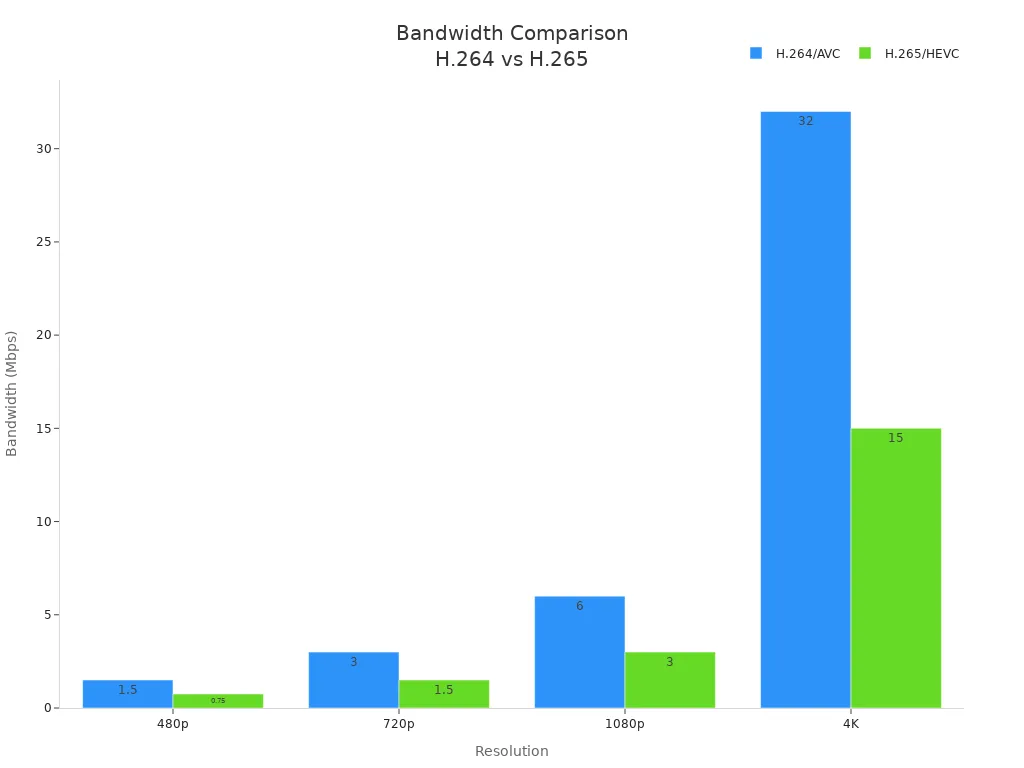
When you pick between H.264 and H.265 for your hd video encoder, you have to think about compression, image quality, and if devices can use it. H.265 gives you videos that look as good as H.264 but the files are about half as big. This is great for high-resolution videos like 4K. It helps save space and uses less bandwidth. You can see in the chart below how H.265 uses less bandwidth than H.264:
If you want your video to work on many devices, H.264 is a good choice. H.265 needs stronger devices but can handle higher resolutions and better compression. Think about what you need, like resolution, bandwidth, and device support, before you choose.
H.265 can shrink video files by about half compared to H.264. This helps a lot with high-quality videos.
Pick H.264 if you want it to work on most devices. It is also easier for live streaming and video calls.
H.265 gives better picture quality with less data. It is great for 4K and 8K videos. But it needs stronger hardware to work well.
Think about what devices your viewers use. If they have older devices, H.264 is a safer pick. It will play more smoothly.
Always look at the license rules. H.264 is cheaper and simpler. H.265 can cost more and have harder rules.
You might know h.264 as avc or advanced video coding. This video codec is a common choice for hd video encoder solutions. Many people use h.264 because it works on almost every device. You can find this encoder in streaming, broadcasting, video calls, and security cameras. H.264 uses inter-frame compression and predictive coding. These methods help make files smaller but keep the picture clear. The encoder works with many resolutions, so you can use it for low or high-definition video. H.264 gives you small files and smooth videos, even if your internet is slow. This codec is vendor-agnostic, so you do not have to worry about it working with different brands.
Feature/Use Case | Description |
|---|---|
Compression Techniques | Inter-frame compression and predictive coding for smaller files. |
Applications | Used in HD DVDs, broadcasting, mobile TV, internet video, video conferencing, and surveillance. |
Low Bandwidth Usage | Good quality at low bit rates. |
High-Resolution Monitoring | Supports many resolutions, great for security and surveillance. |
Broad Compatibility | Works with most streaming protocols and media players. |
H.265 is also called hevc or high efficiency video coding. It is the next step in video codec technology. You use this encoder when you want better compression and higher quality, especially for 4K or 8K video. H.265 can make files up to 50% smaller than h.264, but the video still looks sharp. This codec uses coding tree units, which can be as big as 64x64 pixels. That means the encoder can organize data in a smarter way. H.265 supports 35 prediction modes, so it can guess motion in video much better than h.264. You get smoother streaming and faster downloads, even with high-quality video. HEVC also has tools for error resilience, which helps keep your video steady on weak networks.
Tip: If you want to stream ultra-high-definition video, h.265 is a strong choice for your hd video encoder.
You should know the main differences between h.264 and h.265 before picking an encoder. H.265, or hevc, is better than h.264 in many ways. It uses bigger block sizes and more prediction modes, so it can compress video better and keep the picture nice. H.265 can handle high-efficiency video coding for 4K and 8K video, while h.264 works best for HD and lower resolutions. H.265 needs more processing power, so older devices may not work well with it. H.264, or avc, is easier to use with many devices and workflows.
Metrics | H.265 | H.264 |
|---|---|---|
Block Size | Up to 64 x 64 | 16 x 16 |
Prediction Modes | 35 | 9 |
Compression Efficiency | Higher | Lower |
Computational Needs | Higher | Lower |
You get better video quality at lower bitrates with h.265, but you need newer hardware for smooth encoding and playback. H.264 is still a good choice if you want something that works with many devices and is easy to use.
You want your videos to look clear and sharp. Both h.264 and h.265 can give you good images. H.265, also called hevc, keeps the same quality as h.264 but uses less bit rate. This means your files are smaller but still look nice. H.265 uses bigger coding tree units and better ways to guess motion. These help make colors look better and reduce problems in the picture. You see sharper images and smoother videos, especially with HD and 4K.
H.265 keeps videos looking good at lower bit rates.
Files made with hevc are about half the size of avc files.
You see fewer problems in the picture with h.265.
Compression efficiency is important for saving and streaming video. H.265, or hevc, is better at compression than h.264, also called avc. You can send better video with less bit rate. Studies show hevc gives about 2 dB higher PSNR video quality than avc at the same bit rate. This codec helps you save space and use less bandwidth. You can stream HD or 4K video with less data. This lets you work faster and store more videos.
H.265 lets you have better video with lower bit rates.
Better compression means you use less space and bandwidth.
You get better results for professional work.
You want your codec to keep details and not show problems. H.264, or avc, works fast and on many devices, but may show problems if you compress a lot. H.265, or hevc, keeps more details in smaller files. You see better details with hevc, but it needs more power to run. Your choice depends on what matters most for your work.
Codec | Artifact Generation | Detail Preservation |
|---|---|---|
H.264 | May show problems depending on settings | Good at keeping details, but not as good as h.265 |
H.265 | Can show different problems based on settings | Keeps more details in smaller files, but needs more power |
Note: Pick the codec that fits your needs for quality, speed, and device support. Better compression and high quality make hevc a good choice for modern work.
You need to know how much bandwidth your video will use when you choose a codec. H.264 is a popular codec for live streaming because it works well with many devices. For HD video, h.264 uses more bandwidth than newer codecs. If you stream at 720p, you need about 3 Mbps. For 1080p, you need around 6 Mbps. When you move to 4K, h.264 can require up to 25 Mbps. This means you need a strong network for high-quality streaming with h.264.
Resolution | Required Bandwidth (H.264) |
|---|---|
720p (1280×720) | 3 Mbps |
1080p (1920×1080) | 6 Mbps |
4K (3840×2160) | 25 Mbps |
If you use adaptive bitrate streaming, h.264 can adjust the quality to match your network speed. This helps keep your live streaming smooth, but you may see lower quality if your connection drops.
H.265, also called hevc, gives you better compression than h.264. You can stream high-quality video with less bandwidth. For 720p at 60 FPS, h.265 needs about 4 Mbps. For 1080p at 60 FPS, you need around 9 Mbps. For 4K at 30 FPS, h.265 only needs about 19 Mbps. This codec lets you stream sharp video even if your network is not very fast.
Resolution-Frame Rate combination | H.264 Optimal bandwidth needed | H.265 Optimal bandwidth needed |
|---|---|---|
720p (1280 X 720 @ 60 FPS) | ~7.2 Mbps | ~4 Mbps |
1080p (1920 x 1080 @ 60 FPS) | ~16 Mbps | ~9 Mbps |
4K (3840 x 2160 @ 30 FPS) | ~32 Mbps | ~19 Mbps |
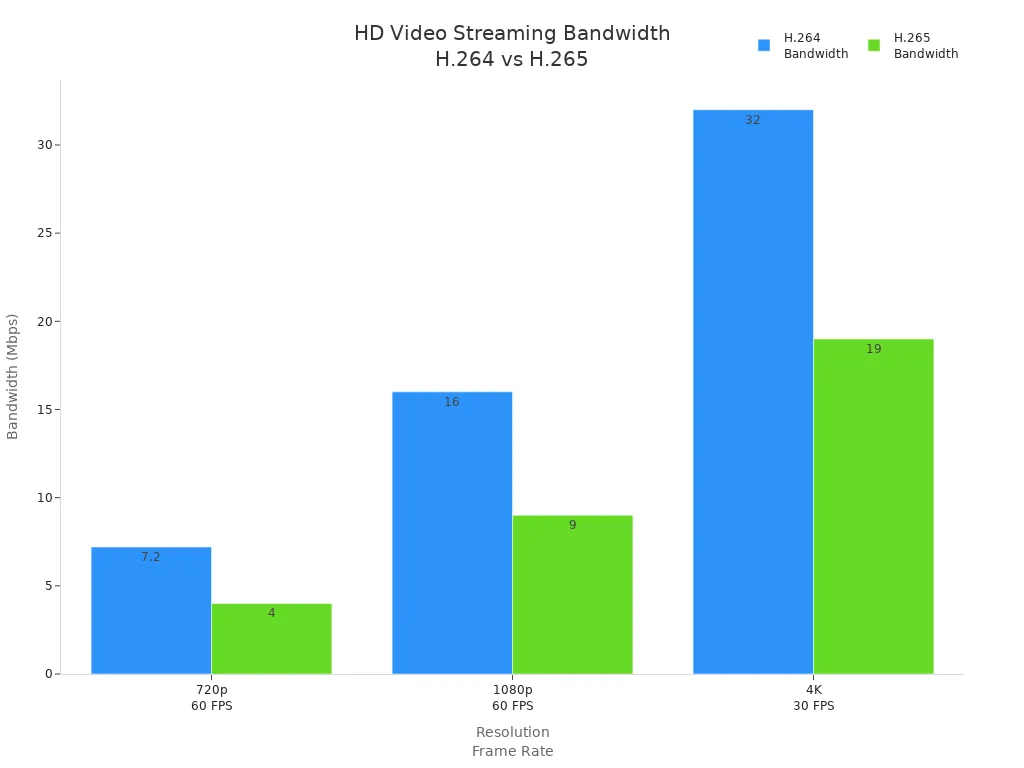
H.265 helps you save bandwidth and still get high quality. This is important for live streaming and adaptive bitrate streaming, especially when you want to reach viewers with different internet speeds.
When you stream 4K or 8K video, you need a codec that can handle high quality without using too much bandwidth. H.265, or hevc, is better for 4k streaming and live streaming of high-resolution content. For 4K, h.264 needs 18-20 Mbps, but h.265 only needs 7-10 Mbps. This big difference comes from the advanced compression in hevc.
Codec | Resolution | Bitrate Required (Mbps) | Compression Efficiency |
|---|---|---|---|
H.264 | 4K | 18-20 | Lower |
H.265 | 4K | 7-10 | Higher |
H.265 | 8K | Not specified | Higher |
You can use adaptive bitrate streaming to give each viewer the best quality for their network. This is key for live streaming events and remote collaboration. You get smooth video, less buffering, and better quality for everyone. If you want to future-proof your workflow, look at new codecs like VVC. These can cut bandwidth in half again while keeping the same quality. This helps you save money and gives your viewers a better experience.
Tip: Choose the right codec for your streaming needs. H.265 and hevc give you better compression and quality for live streaming, especially at high resolutions.

When you work with video encoding, you will see some differences. H.264 uses macroblocks, which are small parts of the video. H.265, also called hevc, uses coding tree units. These units are bigger and more advanced than macroblocks. This makes the video look better but makes encoding harder. H.265 uses more complex math, so your computer has to work harder. Exporting videos with h.265 can take much longer. If your computer is old or does not support h.265, it may be very slow. Watching h.265 videos also needs more power. You might see lag or missing frames when you play them. H.264 usually plays smoother and works better on older devices.
H.265 gives better video quality but needs more computer power.
H.264 is faster and plays better on most computers.
Hardware acceleration can help both codecs work faster.
Your device is important for video encoding and playback. Not every device can use hardware decoding for h.264 and h.265. If you have a new CPU or graphics card, h.265 will work better. Old devices may have trouble with h.265, especially for big video files. Hardware acceleration can make encoding and playback faster. But it depends on your device, operating system, and software.
Device Type | H.265 Min Version | H.264 Min Version |
|---|---|---|
Windows | 8 or later | 7+ |
macOS | Big Sur 11.0 | 10.13 |
iOS | 11.1+ | 2014+ |
Android | 7.0+ | 2.3+ |
Linux | GPU driver support | - |
Browser | H.265 Min Version | H.264 Min Version |
|---|---|---|
Chrome | 107+ | 4+ |
Edge | 12+ | 12.0+ |
Safari | 13+ | 3.2+ |
Opera | 94+ | 25+ |
IE | 11+ | 9.0+ |
Firefox | Not Supported | 35.0+ |
Tip: Make sure your device and software can use h.265 before you pick it. Good hardware support helps you get better video and faster speeds.
You want your work to go smoothly. Both h.264 and h.265 help save space and make streaming better. But h.265’s strong compression can slow down editing and playback. Many people use proxy files or change the format to make editing easier. For the best video quality, use the original h.264 or h.265 files when you finish your project. Playing back the original files can be hard because of how the video is built.
Aspect | H.264 / H.265 Integration |
|---|---|
Advantages | Saves space, streams well, makes smaller files, and gives better streaming. |
Challenges | Strong compression can slow editing, playback may lag, and decoding needs more power. |
Mitigation Strategy | Use proxy files or change formats to edit faster and easier. |
Proxy files let you edit faster but add extra steps.
Playing h.265 files well needs a strong computer.
Always match your workflow to your device and software for the best results.
You want your videos to play everywhere. H.264 gives you the best chance for this. Most devices, browsers, and media players support h.264. You can use it on almost any computer, phone, or TV. H.265, also called hevc, works well on new devices but can cause problems on older hardware. Some older systems and browsers do not support h.265. You may see errors or videos that do not play. H.265 also needs more processing power. Older computers may struggle to play or edit these files.
Codec | Support Level | Notes |
|---|---|---|
H.264 | Widely supported | Works with most software, hardware, and streaming platforms. |
H.265 | Limited support | Needs newer devices and more power. Older devices may not play videos. |
Tip: If you need your video to work on many platforms, h.264 is a safer choice.
You should know about licensing before you choose a codec for professional work. H.264 is popular because it is cost-effective for live broadcasts and streaming. You pay licensing fees for both encoding and decoding. These fees are usually charged per device or per use. H.265 offers better quality and smaller files, but it comes with higher costs. The licensing for h.265 is more complex. Multiple patent groups control it, which can make it expensive for large projects. You need to plan your budget carefully if you want to use h.265 or hevc in your workflow.
H.264: Simple licensing, lower costs, easy to manage.
H.265: Complex licensing, higher costs, more planning needed.
Note: Always check the licensing terms before you start a big project.
You want your videos to last for years. Choosing a widely used format helps you keep your files accessible. H.264 is an open standard and has broad support. This makes it a good choice for archiving. H.265 keeps the same quality as h.264 but uses half the space. However, it needs more processing power. Older devices may not play h.265 files in the future. You should update your storage formats as technology changes. This keeps your videos safe and easy to use.
H.264 gives you better long-term access on many devices.
H.265 saves space but may not work on older systems.
Tip: Use regular format updates to keep your video library future-proof.
Pick h.264 if you want your videos to play everywhere. This codec works for live streaming, video-on-demand, and video calls. Old computers and phones can run h.264 with no trouble. You can choose different profiles and levels for your needs. The baseline profile is good for phones and video chats. The main profile works well for streaming and TV. The high profile gives top quality for pro work.
If you need your video to show up fast, h.264 is helpful. Zerolatency tuning is good for live events or video chats. If your viewers have old TVs or browsers, h.264 is the safest pick. You can use it for adaptive streaming too. This lets the video change quality if your internet is slow.
Tip: Pick h.264 for the best chance your video will play fast on any device.
Here are some ways to use h.264:
Scenario | Description |
|---|---|
Low-Latency Delivery | Zerolatency tuning helps live streams and video calls. |
Compatibility with Old Devices | Baseline profile and level 3.0 work for old phones and tablets. |
Video-on-Demand | CRF settings help balance quality and file size. |
Live Streaming | CBR keeps streaming quality steady. |
Adaptive Streaming | Fixed GOP helps with seeking in HLS or DASH. |
You can see h.264 fits many jobs. It is a strong pick for most hd video encoder needs.
Pick h.265 if you want the best compression and image quality. This codec is great for 4K and 8K streaming. If you need to save space or have slow upload speeds, h.265 is helpful. It keeps your videos sharp and makes files much smaller.
H.265 is good for HDR content and pro archiving. You get fewer problems and better detail, even at low bitrates. New computers, smart TVs, and streaming devices play h.265 smoothly. You can use this codec to keep your video library ready for the future.
Note: Pick h.265 if you want to stream or store high-quality video using less data.
Here are some ways h.265 is useful:
Scenario | Suitability for H.265 Encoding | Why Use H.265? |
|---|---|---|
4K and 8K Video Streaming | High | Needs strong compression and top image quality. |
HDR Content Production | High | Keeps colors and details at lower bitrates. |
Limited Bandwidth/Storage | High | Saves space and reduces data usage. |
You can trust h.265 for new hd video encoder jobs that need high efficiency.
You might wonder how to pick between h.264 and h.265 for your work. Use this table to help you choose:
Aspect | H.264 (AVC) | H.265 (HEVC) |
|---|---|---|
File Size | Bigger (like 20 GB for 2-hour 4K) | Smaller (like 10 GB for 2-hour 4K) |
Image Quality | Good, but some problems in fast scenes | Better, fewer problems |
Bandwidth Usage | Higher (about 25 Mbps for 4K) | Lower (about 12 Mbps for 4K) |
Device Compatibility | Works on almost all devices | Needs newer devices |
Performance | Runs well on old hardware | Needs more computer power |
Smart TV Support | Nearly all Smart TVs | Many new Smart TVs |
Best Use Case | Live streaming, old device support | 4K/8K, HDR, saves storage |
Save bandwidth and storage. H.265 helps cut costs for HD content.
Think about what devices your viewers use. H.264 works everywhere.
Check your computer’s power. H.264 is easier for old devices.
Use adaptive streaming. You can send both codecs based on what viewers need.
Test video quality at different bitrates.
Look at licensing and legal rules for your project.
Keep up with new video standards.
Tip: Always match your hd video encoder to your workflow, device support, and quality needs. When you pick between h.264 and h.265, think about your goals for compatibility, storage, and future needs.
When you pick a video encoder, think about your needs. Your workflow and goals are important. Look at this table to see the main things to compare:
Factor | H.264 | H.265 |
|---|---|---|
Compression Efficiency | Medium compression, bigger files | Better methods, smaller files |
Video Quality | Good quality with medium compression | Higher quality with less data |
Compatibility | Works on most devices | Not all devices support it |
Processing Needs | Needs less computer power | Needs more computer power |
For streaming, choose the codec that fits your platform and internet speed. For saving videos, keep the best quality you can. Always check your workflow so your videos play well everywhere.
Tip: Try to balance compression, picture quality, and device support for the best results.
You get smaller file sizes with H.265. This codec uses advanced compression. You can stream or store high-quality video using less bandwidth and less space.
You may need newer devices for smooth playback. Many older phones, TVs, and computers do not support H.265. Always check your device’s compatibility before you choose this codec.
You see sharper images and fewer artifacts with H.265. This codec preserves more detail at lower bitrates. Your HD videos look better, especially when you stream or save them.
You can rely on H.264 for broad compatibility. Most streaming platforms, editing software, and devices support it. You get stable performance and easy integration into your workflow.
H.264 usually costs less and has simpler licensing. H.265 may require higher fees and more paperwork. You should review licensing terms before you start a large project.


