Views: 0 Author: Site Editor Publish Time: 2026-01-23 Origin: Site
Ever thought about making your HDMI cable go farther? With an HDMI Extender: Four Ways to Extend Your HDMI Cables, you can easily achieve this. You can use an HDMI coupler, an ethernet extender, an active cable or repeater, or a wireless extender. Each method is suitable for different rooms, lengths, and budgets. Consider what works best for you as you continue reading.
An HDMI coupler helps you extend cables fast at home.
HDMI over Ethernet works well for long distances, like home theaters.
Active HDMI cables or repeaters make signals stronger for medium distances.
Wireless HDMI extenders let you set up without cables and move things easily.
Pick the way that matches your distance, money, and setup needs.
When you want to make your HDMI cable reach farther, you have four main options. Each method works best for different setups, distances, and budgets. Let’s look at these four practical and popular ways to extend your HDMI cables.
Tip: Before you pick a method, think about how far you need to go and what devices you want to connect. Some solutions work better for short distances, while others are perfect for long runs or tricky spaces.
Here’s a quick table to show you the four main methods and where people use them most:
Method | Description | Common Use Cases |
|---|---|---|
HDMI Coupler | Joins two HDMI cables together for a longer reach. | Home setups, quick fixes |
HDMI Over Ethernet (HDBaseT) | Uses network cables (like CAT6) to send HDMI signals over long distances. | Home theaters, conference rooms |
Active HDMI Cable or Repeater | Boosts the HDMI signal for longer cable runs. | Home entertainment, classrooms |
Wireless HDMI Extender | Sends HDMI signals wirelessly, no cables needed. | Offices, living rooms, places with obstacles |
Let’s break down each method so you can see which one fits your needs.
You can use an HDMI coupler when you just need a little extra length. This small device connects two HDMI cables, turning them into one longer cable. It’s simple and cheap. You just plug both ends in, and you’re ready to go. Most people use a coupler for quick fixes at home or when they don’t want to buy a new, longer cable.
But there’s a catch. If you go too long, the signal can get weak. For 4K video, you might see problems after about 20 meters. For 8K, it’s even shorter—around 15 meters. Experts say you should keep passive HDMI cables under 25 feet (about 7.5 meters) to avoid signal loss. If you need more distance, you’ll want to try another method.
If you need to send your HDMI signal across a big room or even to another floor, HDMI over Ethernet is a great choice. This method uses a special box called an extender. You connect your HDMI cable to the box, then run a network cable (like CAT6) to the other box near your TV or projector. This setup can send your signal up to 100 meters (about 328 feet) without losing quality.
People use HDMI over Ethernet in home theaters, conference rooms, digital signs, and even hospitals. It’s reliable and works well for both 1080p and 4K video, as long as you use the right equipment. HDBaseT technology can even send extra signals, like USB or remote control commands, along with your video.
Sometimes you just need a longer cable, but you don’t want to mess with extra boxes or wires. That’s where active HDMI cables and repeaters come in. An active cable has built-in electronics that boost the signal. A repeater is a small device you plug in between two cables to do the same thing.
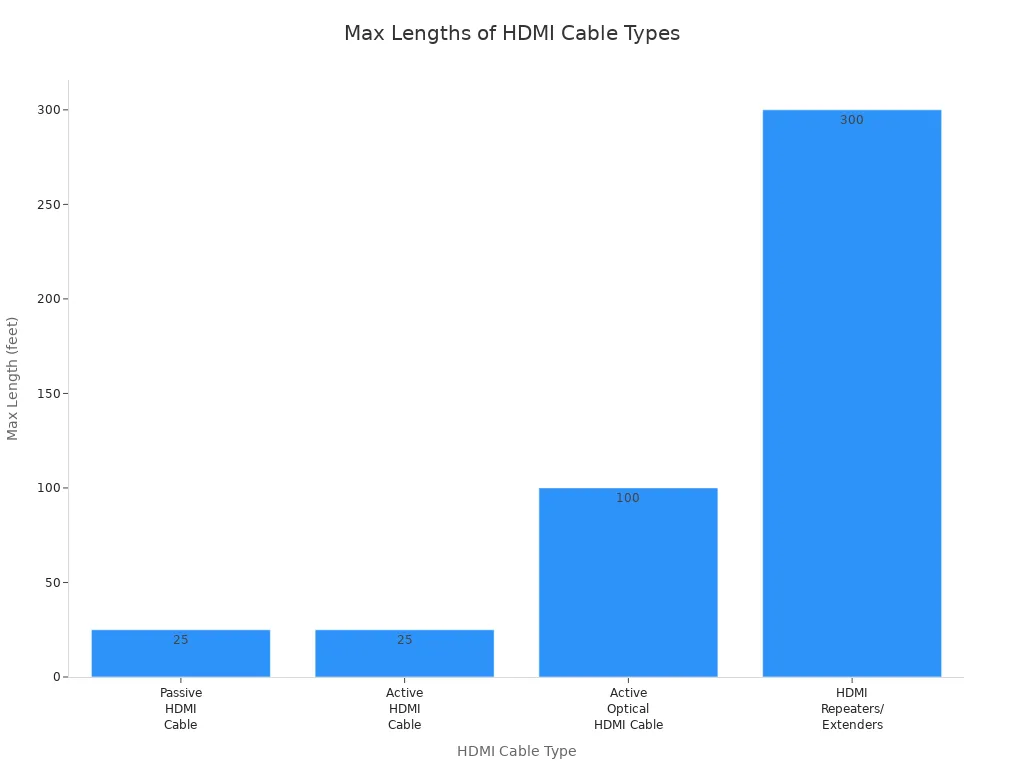
With an active HDMI cable, you can go up to 25 feet. If you use an active optical HDMI cable, you can reach 100 feet or more. HDMI repeaters can stretch your signal up to 300 feet! This makes them perfect for classrooms, meeting rooms, or home theaters where you need a long run but want to keep things simple.
Here’s a chart to show how far each type of HDMI cable or extender can go:
Don’t want to run any cables at all? A wireless HDMI extender is your answer. This device sends your HDMI signal through the air, so you can connect your devices even if they’re in different rooms or on different floors. Most wireless HDMI extenders work up to 50 meters (about 164 feet), but some models can go even farther.
Wireless HDMI extenders are great for offices, living rooms, or any place where running a cable would be a pain. Just keep in mind that wireless signals can have a slight delay—usually between 100 and 500 milliseconds. This might not matter for movies, but it can be a problem for gaming or live events where timing is important. Prices for wireless HDMI extenders range from about $60 to $150, depending on the features and range.
Note: If you need the cleanest setup with no wires, wireless HDMI extenders are hard to beat. Just check the range and make sure it fits your space.
Now you know the four main ways to extend your HDMI cables. Each method has its own strengths, so you can pick the one that works best for your setup and budget.
You might have two short HDMI cables but need one long one. An HDMI coupler helps you join them together. Just plug each cable into the coupler, and you get a longer connection. It works like a bridge between the two cables. This method is quick and easy. You don’t need any tools or special skills. If you want a simple cable extender for your TV or game console, a coupler does the trick. Just remember, if you connect too many cables, the picture or sound might not be as clear.
Sometimes, you need your HDMI signal to travel a long way—maybe across a big room or even to another floor. HDMI over ethernet extenders make this possible. You connect your HDMI cable to a small box called a transmitter. Then, you run a network cable (like Cat6) from the transmitter to a receiver box near your TV. This setup can send video, audio, and even internet or USB signals up to 100 meters. The secret is a technology called HDBaseT. It lets you send uncompressed video, sound, internet, and even power through one cable. Many people use this method in home theaters or offices because it’s reliable and works for long distances.
If you want to stretch your HDMI cable a bit farther without using extra boxes, you can use an active cable or a repeater. An active HDMI cable has tiny electronics inside that boost the signal. A repeater is a small device you plug between two cables to refresh the signal. Both options help you keep your picture and sound clear, even when your cable run gets long. You just plug them in, and they do the work for you. These are great for classrooms or living rooms where you want a simple setup.
Don’t want to deal with cables at all? Wireless HDMI extenders send your HDMI signal through the air. You plug a transmitter into your source device and a receiver into your TV. The signal travels wirelessly, so you can put your devices in different rooms or on different floors. This method is perfect if you want a clean look or need to avoid running wires around furniture. Just keep in mind, wireless signals can sometimes lag a little, especially if there are walls in the way.
When you use an HDMI coupler, you get a quick and cheap way to make your cable longer. You just connect two HDMI cables together. This works well for short distances and simple setups.
Pros:
Easy to use—just plug in and go.
Low cost and easy to find.
Great for quick fixes at home.
Cons:
Signal can get weaker over long distances.
You might see "sparklies" or glitches in the picture if the signal drops.
The quality of your cables and coupler matters a lot. Bad parts can cause problems.
Not the best choice for high-quality video or long runs.
If you want a simple cable extender for a short distance, a coupler can help. For longer runs, you may need something stronger.
HDMI over Ethernet extenders give you a way to send your signal much farther. You use network cables and special boxes to make it work.
Pros | Cons |
|---|---|
Sends HDMI signals up to 150 meters | Needs extra hardware (transmitter/receiver) |
Reliable and steady performance | Can cost more than basic cables |
Supports high-quality video like HDR | Setup takes a bit more time |
Works well in big rooms or offices | May need network knowledge |
You get unmatched reliability and less signal loss, even over long distances. These hdmi extenders are great for home theaters, offices, or anywhere you need a long run. The plug-and-play design makes setup easier than you might think.
Active HDMI cables and repeaters boost your signal so you can go farther without losing quality. They work well for medium distances.
Pros | Cons |
|---|---|
Good for long-distance transmission | Built-in chips can sometimes fail |
No need for extra power in most cases | Not good to chain too many together |
Thinner cables look nicer | May not work with every device |
Cost-effective for many setups | Power supply issues can happen |
You can use a repeater to stretch your signal up to 65 feet. If you need more, you can add another repeater, but each one needs power. These hdmi extenders are handy for classrooms or living rooms.
Wireless HDMI extenders let you skip the cables. You send your signal through the air, which makes your setup look clean.
Advantages | Disadvantages |
|---|---|
No cable clutter | Can have a slight delay (latency) |
Easy to set up | Signal can drop if there is interference |
Flexible placement | Costs more than wired solutions |
No WiFi needed | Image quality may drop with distance or walls |
Wireless hdmi extenders save you time and let you move things around. Just remember, wireless signals can sometimes drop or lag, especially if you have thick walls or lots of other signals nearby.
There are a few ways to make your HDMI cable longer. Each way is good for different needs. Here’s a simple chart to help you compare:
Method | Cost | Installation Difficulty | Supported Distance |
|---|---|---|---|
HDMI Coupler | Low | Very Easy | Short (up to 7.5 meters) |
HDMI Over Ethernet | Moderate | Moderate | Long (up to 100 meters) |
Active HDMI Cable/Repeater | Moderate | Easy | Medium to Long (up to 100 meters) |
Wireless HDMI Extender | Variable | Very Easy | Medium (up to 50 meters) |
Some choices are better for long cables. Others are best for quick and easy fixes.
When picking an HDMI extender, make sure it fits your setup. Here are some things to think about:
Extension distance: Measure how far your cable needs to go.
Resolution and refresh rate: High video quality, like 4K or 8K, may need special cables.
Price: Decide how much you want to spend. Some extenders let you use cables you already own.
Compatibility: Make sure the extender works with your devices.
Setup complexity: Do you want something simple or can you handle a harder setup?
Signal stability: Wired extenders usually give a stronger signal. Wireless ones can have problems if there are walls or other electronics.
Tip: Always check if your extender supports the video quality you need. This is important for gaming or watching high-quality movies.
Not sure which one to pick? Try these steps to help you choose:
Measure the space between your source and your screen.
Decide what video quality you want, like 4K or 8K.
See if you already have Cat6 or HDMI cables at home.
Make sure you have power outlets where you need them.
Check if your devices need special features, like HDCP or remote control.
Think about the future. Will you need more speed later?
Stay away from brands you don’t know or products without safety marks.
If you only need a short cable, a coupler or active cable is a good choice. For longer cables, HDMI over Ethernet is a strong option. Wireless HDMI extenders are great if you want no wires at all. Pick the way that fits your room, your devices, and your budget.
You can make your hdmi cables longer in four easy ways. You can use couplers, ethernet extenders, active cables or repeaters, and wireless extenders. Each way has its own good points, like going farther or being simple to set up. Here is a table that shows what each one does best:
Method | Maximum Distance | Key Benefit |
|---|---|---|
Standard Copper HDMI | Up to 15 meters | Good for short and straight connections |
Fiber Optic HDMI | Up to 300 meters | No signal loss, great for long distances |
Twisted Pair Extenders | Up to 200 feet | Saves money for medium-length runs |
Think about how big your room is, what video quality you want, and how much you want to spend. If you pick the right hdmi solution, you can connect your devices the way you want. Making hdmi cables longer is simple when you choose the method that fits your needs.
Standard HDMI cables are good for short distances. For longer runs, you should use fiber optic hdmi extenders or coaxial hdmi extenders. These keep your signal strong and clear, even if your devices are far away.
Fiber optic hdmi extenders send signals using light. They work well for very long distances and do not get much interference. Coaxial hdmi extenders use copper cables. They are better for medium distances and cost less money. Both types help you make your HDMI signal go farther.
Most fiber optic hdmi extenders can show 4K video. You get clear pictures and smooth movement, even with long cables. Always check the product details to make sure it does what you need.
Coaxial hdmi extenders are easy to set up. Just connect the transmitter and receiver with a coaxial cable. Then plug in your HDMI devices. You do not need special tools or skills.
You can use fiber optic hdmi extenders and coaxial hdmi extenders with gaming consoles. You will get low lag and good video quality. This is great for big rooms or when your console is far from your TV.


